
How to follow a junior tennis match live from anywhere
You can follow a junior tennis match live by opening a live score link. The person scoring the match sends it to you, you open it in any browser, and you see the score as it changes. You do not need an app or an account to watch.
The problem
Junior tournaments are spread over many courts and many days. A coach may be watching another player, and grandparents, brothers and sisters or a parent who is working are somewhere else entirely. Waiting for a text message that says "she won" tells you the result but not how the match went.
How a live score link works
Someone at the court scores the match point by point on their phone with CourtDuo Stats. From the scoring screen they choose Share live link, which opens the phone's share menu, so the link can go to WhatsApp, Messages, Mail or anyone else. The link opens a simple page that shows the current score. If the person scoring has no signal, they keep tapping and the points are sent when the connection returns, so the live page can pause for a while and then catch up.
The link only works once the first point has been recorded. A link opened before that shows a "not found" page.
What the viewer sees
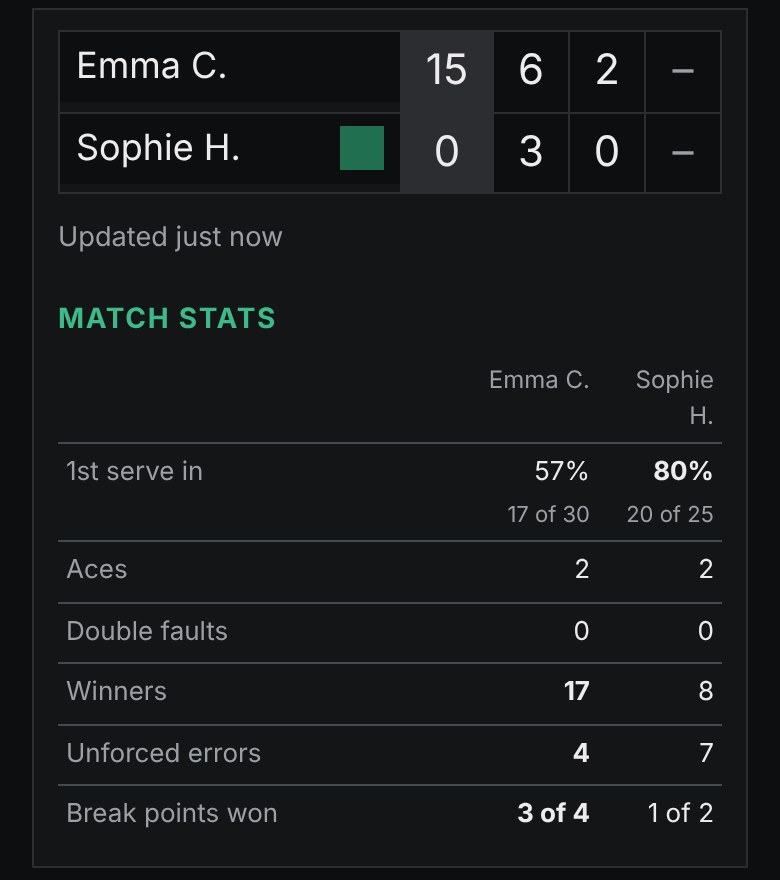
- The score in sets, the games of the current set and the points of the current game.
- A marker showing who serves.
- A "Match over" line and the final result when the match has finished.
- A line saying how long ago the last point arrived, for example "Updated 2 minutes ago".
- For matches recorded with full stats (Duo plan, Coach plan or a Match pack), a short table of match statistics under the score.
The page refreshes by itself every few seconds. Viewers do not log in, do not install anything and do not pay.
Who it helps
A coach with several players in one tournament can keep an eye on the others without leaving their own court. Parents who had to stay at home can follow along, and grandparents do not need to install anything or remember a password. Because the link is just a web address, it works on a phone, a tablet and a computer.
Privacy
The live page shows only the players' first names with the initial of their surname, and the score. It does not show surnames, the tournament, the date, the venue or anything about the account. Search engines are asked not to list live pages. Even so, anyone who has the link can open it, so send it only to people you want to follow the match.
How to stop the link
The person scoring can choose Stop live link on the scoring screen at any time. The old link then stops working straight away. If they want to share again, they share a new link. A link also stops working by itself about 20 minutes after the match has finished. The match itself stays in the owner's account.
Tips for the person scoring
- Share the link before the match starts, so people can open it as soon as the first point is recorded.
- If rallies are fast, use score only mode. The live page needs only who won each point.
- Tell viewers that a frozen score usually means a weak signal at the court, not that the match has stopped.
Want to see what the scorer ends up with? Open the example match, or read how to track tennis match stats.